


Viva
4.61.73K Reviews
App Specs
- Version
- 2.62.1
- Updated On
- License
- Free
- Downloads
- 5,000,000+
- Developer
- Viva Aerobus
- Categories
- Travel & Local
- Platform
- Android, iOS
Screenshots
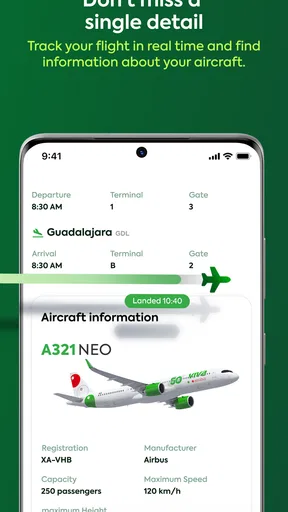
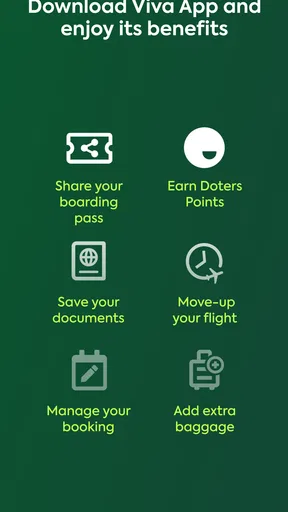
 Analysis by AppCompare
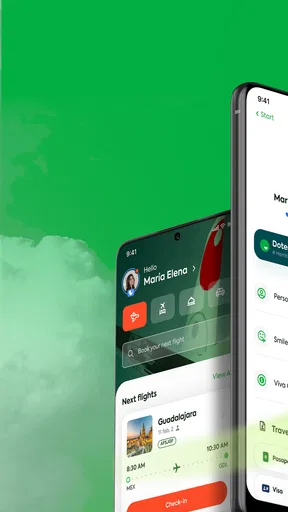
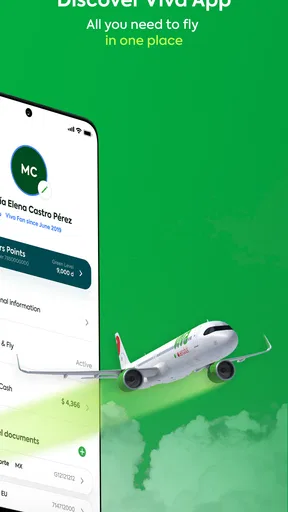
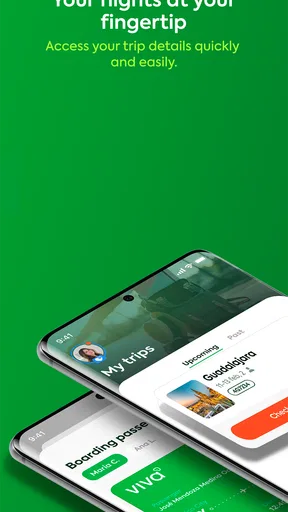
When I travel with Viva Aerobus, the part I value most is not the excitement of opening a new airline app; it is having the practical details of a trip in one place. Viva is a free Travel & Local app from Viva Aerobus that brings together reservation access, check-in, travel documents, and the boarding pass. That sounds simple, but those are exactly the items I do not want to hunt through email while standing in an airport line.
I spent time judging it as an everyday travel tool rather than as a one-time download. The first use is naturally the most satisfying because the app turns an upcoming flight into a more visible checklist. The harder question is whether it continues earning space on my phone between trips. My answer is mostly yes for people who regularly fly with this airline, but much less so for travelers who use several carriers and want one universal travel organizer.
What the first week feels like
The initial appeal comes from focus. Instead of trying to cover every airline, hotel, train operator, and itinerary service, Viva is built around the Viva Aerobus journey. I can open it with a specific purpose: find my reservation, complete check-in, review the documents connected to the trip, or bring up the boarding pass. That narrow scope makes the app easier to understand than a broad travel platform filled with unrelated planning tools.
For a first-time user, the most useful habit is to open the app before the airport day, not only when boarding is about to begin. I would check that the reservation appears correctly, look over the travel information, and make sure the boarding pass is available after check-in. This gives me time to deal with an account or reservation issue while I still have a stable internet connection and a few minutes to think.
That preparation matters in a realistic situation. Imagine leaving home before sunrise, carrying a small bag, and arriving at the terminal with a phone battery that is already lower than expected. The app cannot solve a dead phone, but using it earlier lets me verify the important material before the rush. I would keep the boarding pass ready, save a backup where appropriate, and avoid relying on a last-second login as the only way to reach the gate.
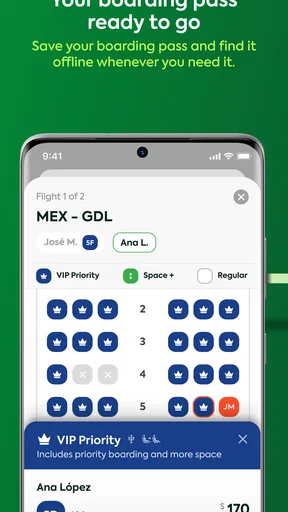
The boarding pass is the feature that gives the app its strongest immediate reason to exist. A mobile pass is more convenient than searching an inbox attachment, especially when a trip has generated several messages with similar subject lines. I also like that reservation access and travel documents sit close to the boarding workflow instead of being scattered across separate services.
There is a useful distinction here: Viva is not a replacement for careful travel preparation. It is a control panel for the airline portion of the trip. I still need to know where I am going, how I will reach the airport, what identification I need, and what belongings I am carrying. The app reduces friction around the flight, but it does not remove the responsibility of checking the rest of the journey.
Worth Reading Before You Choose

EA SPORTS FC Mobile 26 Is a Bigger Football Game, but It Takes Time

Flipboard Shows What News Apps Must Do Beyond the Feed

Switching to Android Auto Means Rethinking Your Driving Routine

Google Calendar Makes a Crowded Week Easier to Manage

Ludo King Makes the Most of the Minutes Between Plans

Baby Panda World Brings Quick Play to Modern Phones, but Its Game Library Feels Busy
The application has a 4.6 average from around 86 thousand ratings, and its audience is substantial, with over 5 million installs. Those figures do not guarantee that every phone or every trip will feel perfect, but they do suggest that this is an established tool rather than an experimental companion. Viva Aerobus is also clearly identified as the developer, which makes the app’s airline-specific purpose easy to understand.
Where it beats the usual alternatives
The most obvious alternative is using a mobile browser and opening the airline’s website whenever I need a reservation or boarding pass. That can work, but an installed app is more direct when I already know I am flying with Viva Aerobus. I do not have to remember which browser tab contains the booking or start from the airline’s general homepage each time.
Email is another common fallback. It is useful as a record, but it is not always the cleanest place to manage a live travel task. A message may be buried under promotions, forwarded between passengers, or difficult to locate when the connection is poor. The app gives the airline-related material a dedicated destination, which is a small advantage until the moment I need it quickly.
Compared with a general itinerary organizer, Viva has the opposite strength and weakness. A universal travel app may combine flights from different airlines with hotels, trains, and reservations. That is better for a complicated multi-company journey. Viva is better when the immediate problem is specifically a Viva Aerobus booking and I want the carrier’s own check-in and boarding workflow in front of me.
For that reason, I would not install it expecting a complete vacation planner. I would install it because a Viva Aerobus flight is part of my plans. The distinction prevents disappointment and also makes the app’s focused design more valuable.
Why it can remain useful from month to month
The recurring value depends almost entirely on how often I use Viva Aerobus. If I fly with the airline several times, the app becomes a familiar starting point for every booking. The benefit is not a new feature discovered each month; it is the reduced mental effort of repeating the same travel routine. Open the app, locate the trip, complete the relevant step, and return to it when the boarding pass is needed.
That kind of repetition is easy to underestimate. Travel tasks are often performed while distracted, in a queue, or with several people asking questions. A predictable airline-specific workflow can be more useful than a feature-rich alternative that I use only occasionally. Once the habit is established, the app’s value comes from being dependable and recognizable rather than entertaining.
I also see value for people who arrange travel for someone else. A family member may book a flight while another person actually travels. Keeping the airline app available on the traveler’s phone can make the final preparation less dependent on searching through the original booking conversation. It is still wise for the traveler to understand the reservation personally, but the app can make the handoff cleaner.
Frequent travelers should think of the app as a trip tool, not necessarily a permanent daily companion. I would keep it installed if I have another Viva Aerobus journey coming up or expect to book one soon. If months pass without a flight, the app may stop providing practical value, and removing it until the next trip is a reasonable choice. Reinstalling a free airline app is less burdensome than carrying a collection of unused travel apps indefinitely.
The current version is 2.62.0, and the app runs on operating system version 10 or later. That compatibility point matters before a trip: I would check the phone rather than discover at the airport that an older device cannot install or update the application. A traveler with an older handset may be better served by preparing through the browser or printing essential documents in advance.
Because the app is free, the decision to keep it is mainly about convenience, storage, and personal travel habits rather than a subscription commitment. It is suitable for Everyone, which fits its practical purpose and makes it approachable for a broad range of passengers. Still, an age rating does not replace supervision or good preparation when a child is traveling with documents and reservations managed by an adult.
Small workflows that make a difference
My first tip is to separate “having the app” from “being ready to travel.” After installing it, I would sign in or retrieve the reservation while at home, then revisit the trip once check-in becomes relevant. Doing this early exposes problems when I can still use a larger screen, a stronger connection, or another device for reference.
My second tip is to treat the boarding pass as one part of a backup plan. I would not assume that the app alone is enough if the phone is damaged, lost, out of power, or unable to connect. Keeping the reservation details accessible through another safe method and carrying the required identification is sensible. The app makes the digital process easier; it should not become the only thing holding the journey together.
My third tip is to open the correct reservation before moving through the airport, especially if I have more than one upcoming trip. A dedicated airline app is convenient, but convenience can lead to rushing. I would pause and confirm that the displayed journey is the one I am taking that day before presenting anything at the airport.
A fourth useful habit is to avoid deleting the app immediately after landing if I may need the reservation or travel documents during the rest of the trip. Once the return flight is complete and there is no remaining airline task, I can decide whether the app still deserves space. That simple cleanup keeps the application from becoming digital clutter while preserving its value during an active journey.
The maintenance burden and where fatigue begins
Viva is relatively light to maintain because its purpose is narrow, but airline apps are still tied to time-sensitive travel. I need to keep the application available, make sure the phone remains compatible, and check the trip rather than assuming that an old screen is still the right one. The maintenance is not constant, yet it matters more than it would for a casual entertainment app because a small oversight can appear at an inconvenient moment.
The biggest source of fatigue is that I may only need the app intensely around a flight. Between trips, it can feel dormant. A general travel organizer may justify its place through daily itinerary planning, destination notes, or multiple bookings, while Viva’s usefulness rises and falls with my Viva Aerobus schedule. That is not a flaw in the core concept, but it affects whether I personally keep it installed all year.
Another limitation is the airline-specific boundary. If my outbound flight is with Viva Aerobus and my return is with another carrier, I may still need a second airline app or a browser for the other half of the journey. A traveler who values one consolidated view might prefer a broad travel service, even if that service is less direct for Viva’s own check-in and boarding material.
I would also avoid treating the app as a complete answer to airport uncertainty. It can place the relevant airline information within reach, but I still need to allow time for security, locate the correct terminal or gate information, and respond to changes as they arise. The app is most helpful when it supports a calm routine, not when I expect it to replace every source of travel awareness.
There is a psychological trade-off as well. Having the boarding pass on the phone feels reassuring, but it can encourage me to postpone preparation because I assume everything will be available later. I think the better approach is to use the app early, then inspect it again before leaving. That turns its convenience into a habit instead of a last-minute gamble.
For passengers who rarely fly, the browser may be enough. Someone taking one Viva Aerobus trip and trying to minimize installed apps might reasonably use the airline’s web route, keep the confirmation details organized, and carry a backup. On the other hand, that choice gives up the speed and familiarity of a dedicated app. The right option depends less on technical preference than on whether this airline is part of the person’s recurring travel pattern.
Who gets the most from it
I would recommend Viva most strongly to regular Viva Aerobus passengers, people who dislike searching through email, and travelers who want the airline’s check-in and boarding materials separated from unrelated trip information. It is also a sensible choice for anyone who prefers preparing on a phone and wants a repeatable process before each flight.
I would be more cautious for travelers with an older phone, unreliable access to their device, or a multi-airline itinerary that needs one combined dashboard. Those users should prepare a second route to their documents and may find a browser or general travel organizer more suitable. The app can still help with the Viva Aerobus segment, but it may not be the best central tool.
Families should decide whose phone will hold the active travel information. If one adult manages every reservation, the app may be convenient for that person but less useful to the passenger at the gate. I prefer making sure the actual traveler can reach the boarding material or has a clear backup, rather than assuming another family member will always be available.
Does it earn lasting space?
After the novelty fades, Viva remains useful because it supports a recurring task rather than trying to create a new reason to open it every day. Its lasting value is practical: reservations, check-in, travel documents, and boarding passes are the exact pieces I want close at hand when flying with Viva Aerobus. The app does not need to be exciting to justify itself during an active trip.
My final judgment is therefore conditional but positive. If Viva Aerobus is one of the airlines I use, I would install this free app before traveling and build it into my preparation routine. I would check the reservation early, retrieve the boarding pass with time to spare, and keep a sensible backup. Those habits make the app feel like a reliable travel instrument rather than a last-second rescue.
If I fly with many different airlines or rarely travel, I would not force it into a permanent place on my phone. A browser or broader itinerary app may serve that pattern better, while Viva can be installed when a specific Viva Aerobus trip becomes active. That is not a rejection; it is an honest recognition that the app’s strength comes from focus.
In my experience, the best reason to keep it is repeated simplicity. Each trip can follow the same sequence without rebuilding the process from scratch. The main weakness is equally clear: outside those trips, there is little reason to open it. For the right passenger, that focused usefulness is enough. Viva earns lasting space when it becomes part of a dependable flight routine, not merely another app downloaded before departure.
With its 4.6 average, broad adoption, free access, and airline-specific purpose, Viva is an easy recommendation for current or frequent Viva Aerobus customers. I would use it, prepare with it, and keep it during an active itinerary. I would simply avoid confusing a convenient flight companion with a complete travel planner.
Pros
- Easy-to-use interface for quick video creation
- Large library of templates
- effects
- stickers
- and music
- Useful editing tools for trimming
- cropping
- and adjusting clips
- Supports multiple aspect ratios for social media platforms
- Exports projects in several resolutions and formats
Cons
- Some advanced features require a paid subscription
- Free exports may include a VivaVideo watermark
- Ads can interrupt editing and clutter the interface
- High-resolution projects may use considerable storage space
- Complex edits can cause lag on older devices
FAQs for Viva
What is Viva, and what can I use it for?
Viva is a multimedia application designed to help users create, edit, and share engaging content from a mobile device. Depending on the version available in your region, it may include tools for video editing, filters, effects, music, text overlays, templates, and social sharing. Its interface is generally aimed at beginners, although more experienced users can also use its timeline and adjustment controls for faster editing.
Is Viva free to download and use?
Viva can usually be downloaded for free, but some features may require in-app purchases or a premium subscription. Free users may have access to basic editing tools, effects, templates, or export options, while advanced content and additional controls can be restricted. Before confirming a subscription, check the pricing, renewal terms, trial period, and whether exported projects include branding or other limitations.
Does Viva add a watermark to exported videos or images?
Whether Viva adds a watermark depends on the specific version, export settings, and type of account you use. Some free editing applications place branding on content created with the free plan, while premium users may receive watermark-free exports. It is best to create a short test project before completing a larger edit, especially if you plan to publish the result for professional, commercial, or social media use.
Can I use Viva without an internet connection?
Viva may allow certain basic editing functions to work offline after the application and required resources have been installed. However, an internet connection is commonly needed for downloading templates, music, effects, cloud features, advertisements, account services, updates, and sharing content online. Offline availability can also vary between Android and iOS, so users should test the tools they need before traveling or working without reliable connectivity.
Is Viva safe to install, and what permissions does it request?
Viva should be downloaded from the official Google Play Store or Apple App Store to reduce the risk of modified or unsafe installation files. Because it works with media, it may request access to photos, videos, storage, the camera, or the microphone. Review these permissions before granting them, and disable any access you do not need. Also check the developer name, privacy policy, ratings, and recent user feedback.


